
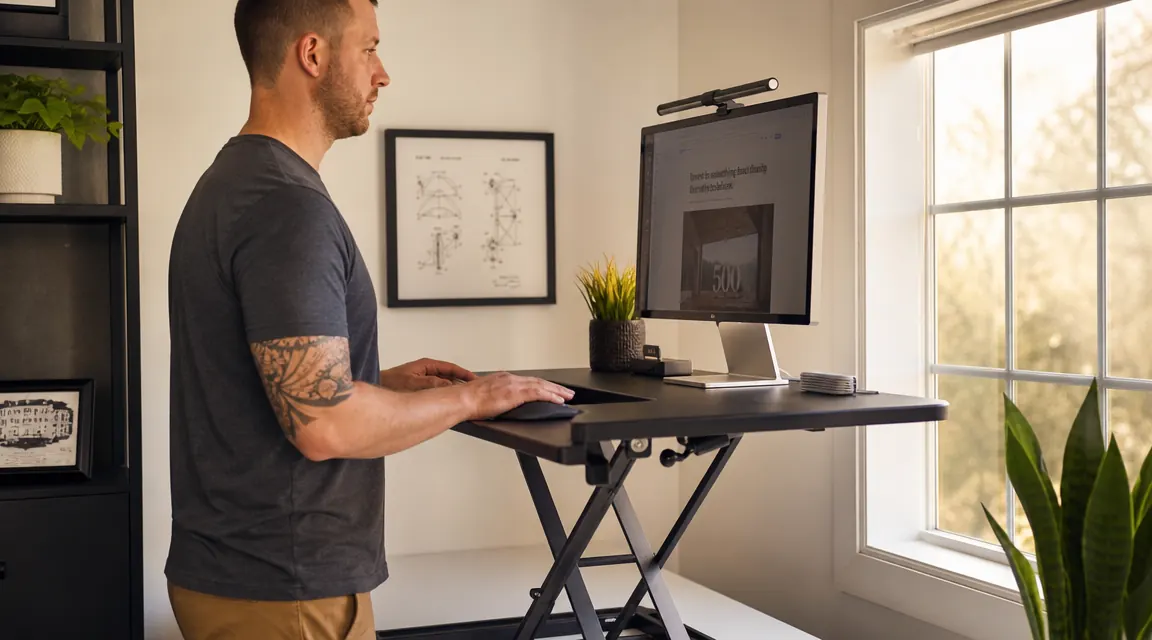
A year ago I set the TechOrbits 32-inch standing desk converter on top of my existing desk and figured I would give it three weeks before deciding whether it was staying or going back in the box. It is still there. That alone tells you most of what you need to know. But if you are spending money on something that will live on your desk every single day, you deserve a more honest accounting than 'still there.' So here it is: what I liked, what I did not, and who I would actually tell to buy it.
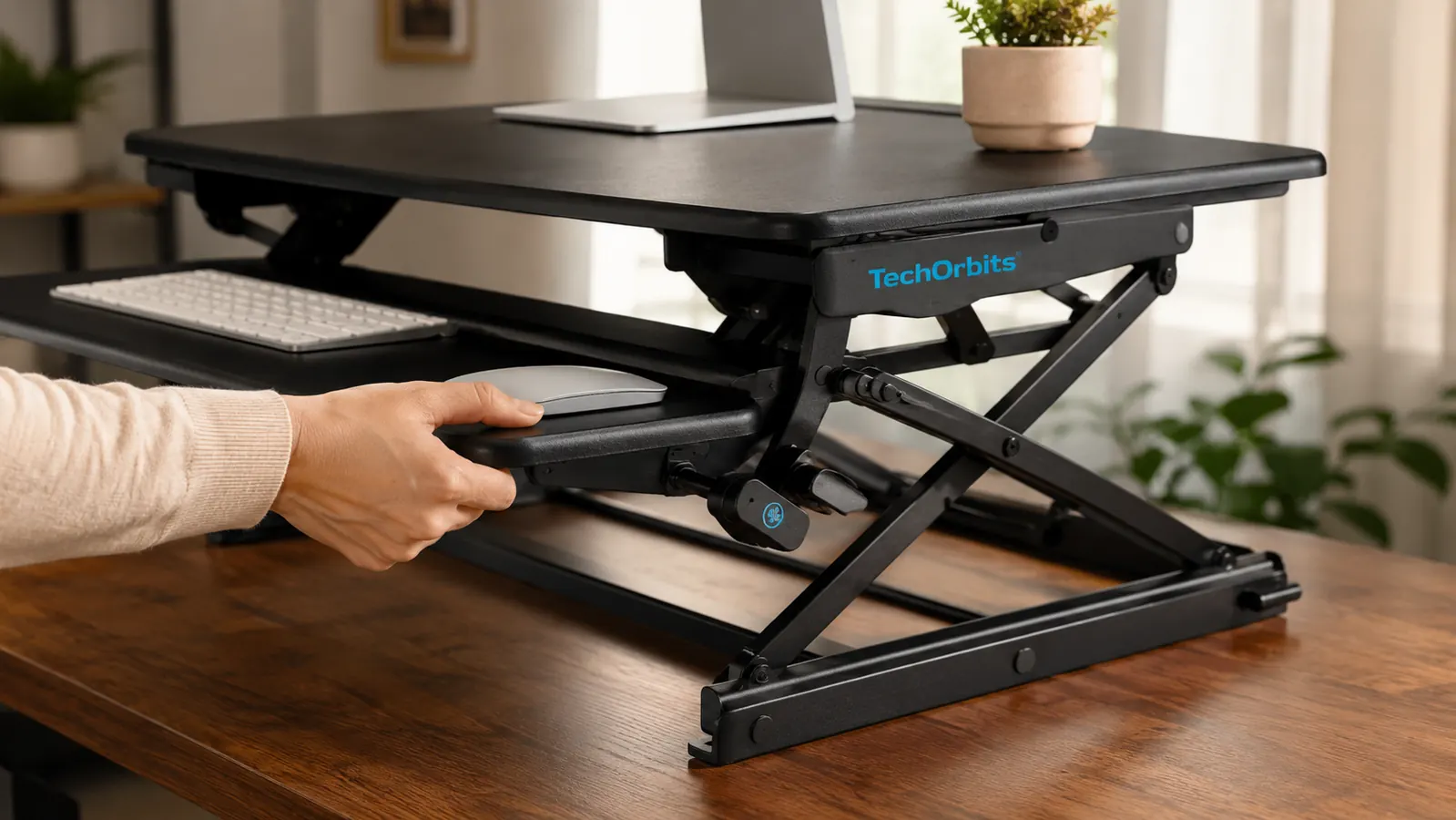
The TechOrbits Standing Desk Converter comes in a 32-inch wide version (the one I have) and a larger 36-inch variant. It uses a spring-assisted X-lift mechanism to raise and lower the platform. The keyboard tray slides out and sits a few inches lower than the main surface, which is how a proper sit-stand converter is supposed to work. Out of the box assembly takes about fifteen minutes. There are no tools required beyond what ships in the box.
The Quick Verdict
A solid, no-fuss desk converter that earns its footprint for anyone who wants to alternate sitting and standing without buying a new desk. The wobble at max height is the one real tradeoff.
Amazon Check Today's Price →Your back already knows it needs this. Check today's price before you talk yourself out of it.
The TechOrbits 32-inch standing desk converter has 7,000-plus verified reviews on Amazon. It ships fast and sets up in under twenty minutes. If your lower back has been talking to you after long sitting sessions, this is the most affordable fix I have found.
Amazon Check Today's Price on Amazon →How I've Used It
My home office is a spare bedroom that doubles as a storage room when relatives visit, which means the desk setup has to be practical and unobtrusive. I work from home full-time, usually six to eight hours at the keyboard. Before the TechOrbits converter, I was sitting the entire time and my lower back would start complaining around 2 p.m. every day without fail. I tried a lumbar pillow. I tried taking walks. Neither fixed the root problem, which was just sitting too much.
I set up the TechOrbits on a standard 60-inch IKEA desk with no issues. The converter footprint is 32 inches wide by about 16 inches deep when lowered, which left me enough desk space on either side to keep a notepad and a cup. I work primarily with a 27-inch monitor, a full-size mechanical keyboard, and a standard mouse. That combination fits on the platform without any crowding. If you have a 34-inch ultrawide, you would want the 36-inch version or you will be hanging monitor off the edge.
My typical rhythm became: sitting from morning until about 11 a.m., then raising the converter for 45 minutes to an hour of standing, dropping it back down for lunch and early afternoon, then standing again for another 30 to 40 minutes before the workday ends. I did not set out to hit some ideal sit-stand ratio. I just raised it when I felt stiff and lowered it when I felt tired. That turned out to be the right approach.
The Lift Mechanism: Spring-Loaded and Actually Smooth
The X-frame spring mechanism was the thing I was most skeptical about before buying. I had tried a cheaper converter two years earlier that used a knob you turned to lock each height increment, and the experience was terrible. Every height change required both hands, real effort, and a minute of frustration. The TechOrbits uses two paddle levers on either side that release the spring tension, letting the platform rise or fall almost by itself. You guide it up or down with light pressure on the surface while holding the levers. Start to finish, changing height takes about five seconds.
After twelve months, the mechanism still operates exactly as it did on day one. No creaking, no sticking, no change in spring resistance that I can detect. The levers feel solid. I have raised and lowered this thing probably 500 times at this point and there is no sign of wear. That is the kind of build quality you hope for in something with moving parts and do not always get at this price.
Changing height takes about five seconds. After 500 uses over twelve months, the mechanism still operates exactly as it did on day one.
Wobble at Max Height: The Honest Part
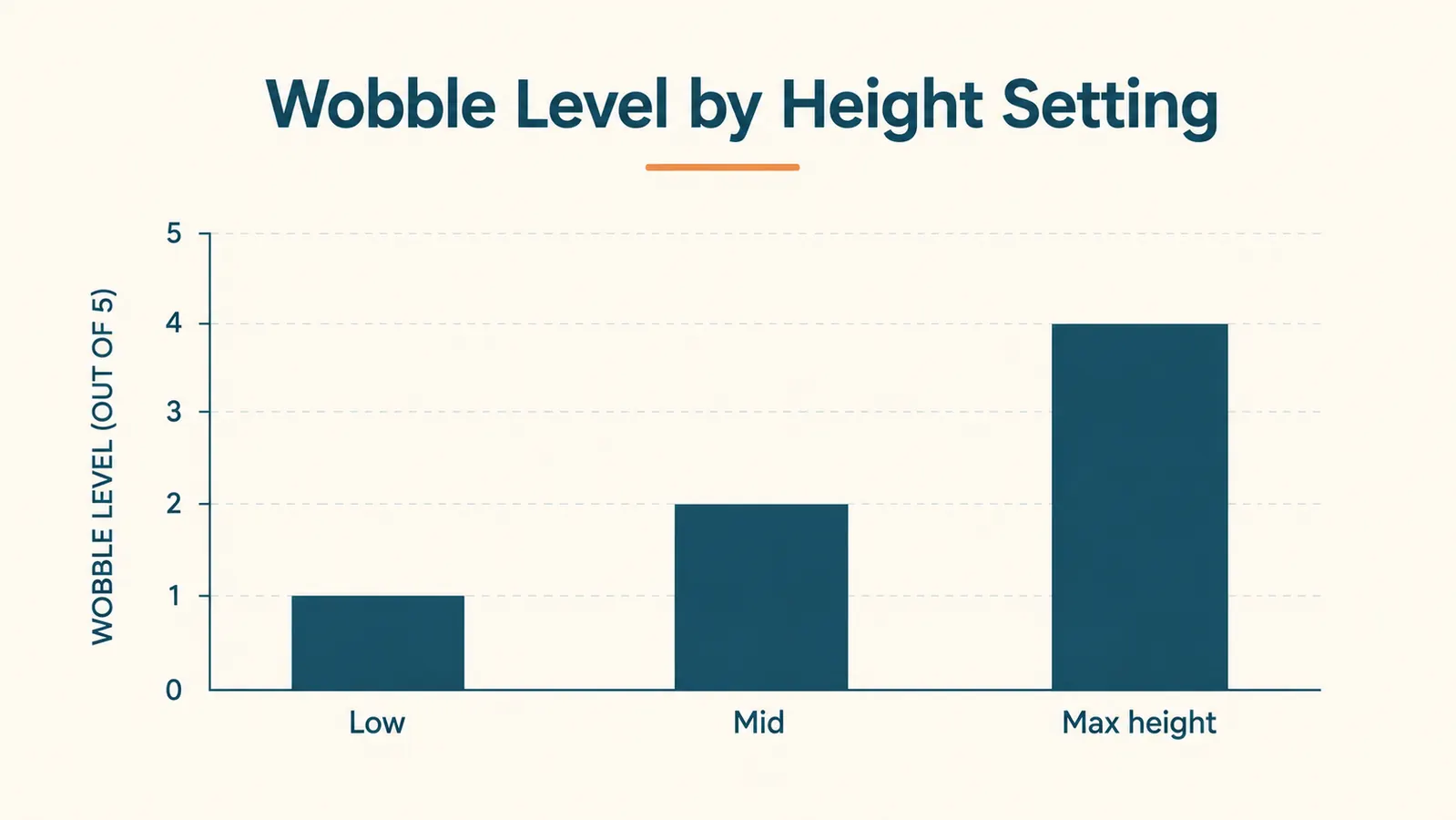
Here is where I am going to be straight with you. At maximum height, the TechOrbits wobbles. Not violently, not enough to knock things over, but if you type with any force at all and you are at the top of the height range, the platform moves. Not a lot. But you will notice it. If you are the kind of person who types gently on a laptop keyboard you will probably not care. If you have a mechanical keyboard and you type the way I type, you will feel it.
My standing height is 6 feet 1 inch. For me, the right standing work height puts the TechOrbits about two-thirds of the way up, not at maximum. At that position, stability is very good. The wobble is essentially a max-height phenomenon, and if your ideal standing height does not require maximum extension, you may never encounter it. But I want you to know it exists before you buy, not after.
I should also note that the wobble is worse on a desk with any flex in its surface. My IKEA desk is fairly stiff. I set the converter up on a friend's hollow-core table temporarily and the movement was noticeably more pronounced. The converter is not the only variable here.
Keyboard Tray: Genuinely Useful, With One Caveat
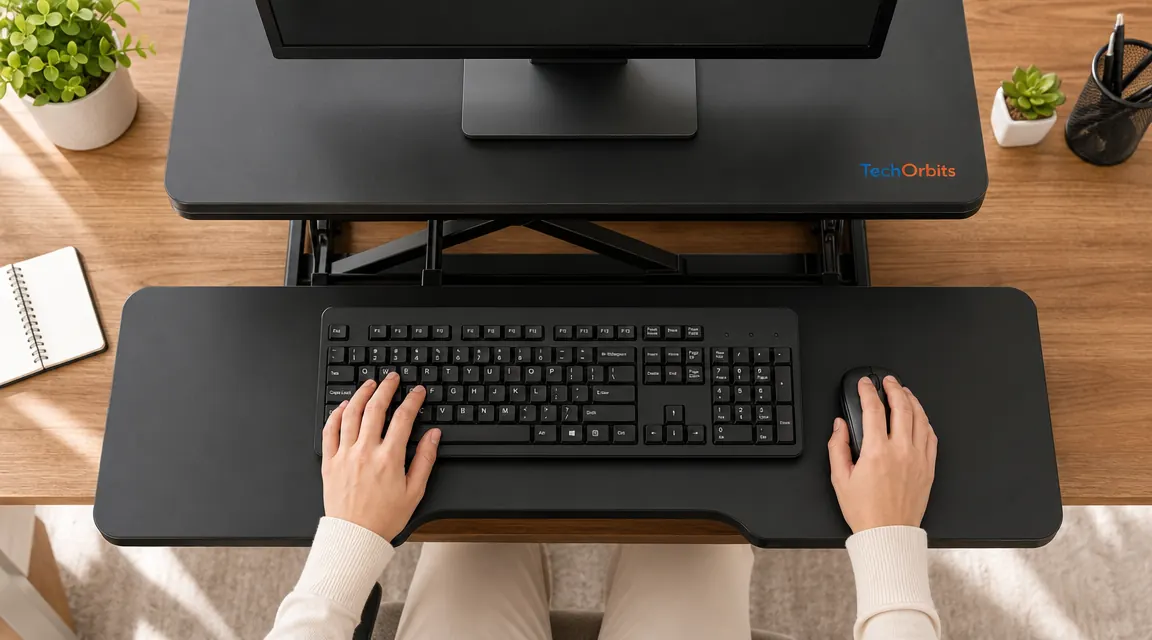
The keyboard tray slides out from underneath the main platform and locks into position. It sits roughly three to four inches lower than the main surface, which creates the correct ergonomic offset for your wrists. On a full-size keyboard with standard key travel this feels right. The tray is wide enough for a full-size keyboard plus a standard mouse with maybe two inches to spare. If you use a keyboard with a numpad and a larger gaming mouse, you will be fighting for space. A tenkeyless or compact layout keyboard fits much more comfortably.
The tray does not tilt. Some higher-end converters offer a tilt option that lets you put the keyboard at a negative angle, which some ergonomics people prefer. The TechOrbits is flat. For most people that will not matter. If you already know you need a negative tilt, this is not your converter.
Weight Capacity, Surface Feel, and Long-Term Durability
TechOrbits rates the converter at 33 pounds of capacity. I have never tested the limit but I run a 27-inch monitor, a laptop stand with a MacBook, a keyboard, mouse, and a small USB hub on the platform without any issue. The surface finish is a matte black that does not show fingerprints and does not scratch easily. After a year of daily use, the surface looks essentially the same as when I took it out of the box. I spilled coffee on it once. It wiped clean.
Cable management is minimal. There are no built-in channels or clips to route your monitor and keyboard cables. The cables just dangle when the platform rises. This bothered me for about a week and then I stopped noticing it. If you want clean cable routing you will need to add your own adhesive clips, which cost almost nothing and take ten minutes. I did it eventually and it made a real difference visually.
How It Compares to the Alternatives I Considered
Before buying the TechOrbits, I looked seriously at the FlexiSpot M7B, which sits higher in price. The FlexiSpot has a slightly wider footprint and better stability at maximum height, but the height adjustment mechanism requires more effort to operate. For daily use, the TechOrbits is faster and more pleasant to raise and lower. If you stand all day and never sit, the FlexiSpot's extra stability at max height might be worth the premium. If you are alternating throughout the day like most people, the TechOrbits mechanism wins. I cover that comparison in full in my TechOrbits vs FlexiSpot head-to-head.
I also looked at a full motorized standing desk, which I ultimately ruled out because I rent and do not want to move a 70-pound desk. If you own your home and want a permanent setup, a full standing desk is probably a better long-term investment. But for renters, people in small spaces, or anyone who wants to keep their existing desk, a converter is the smarter path. I wrote more about that reasoning in my piece on 10 reasons a desk converter beats a full standing desk for small apartments.
What I Liked
- Lift mechanism is fast and smooth, takes about 5 seconds per height change
- Build quality feels solid after 12 months and 500-plus uses with no degradation
- Surface finish resists scratches and wipes clean
- 32-inch width handles a single 27-inch monitor plus keyboard and mouse without crowding
- Assembly under 15 minutes, no extra tools needed
- Spring assist means you are not fighting the weight of your gear each time you adjust
Where It Falls Short
- Noticeable wobble at maximum extension when typing with any force
- Keyboard tray does not tilt, which matters if you need negative keyboard angle
- No built-in cable management
- Tight fit for keyboards with full numpad plus a large mouse
- Max height may not be enough for users above 6 feet 3 inches

Who This Is For
The TechOrbits makes the most sense for someone who sits at a desk for six or more hours a day, has back or neck stiffness that worsens through the afternoon, and wants to alternate sitting and standing without replacing their current desk. It also works well for renters or people in smaller spaces where a full motorized standing desk is impractical. If you are in that position and your ideal standing height falls in the lower two-thirds of the converter's range, you are going to be happy with this purchase. Most people who buy it and use it regularly report that the afternoon stiffness problem goes away, and that matches my own experience.
Who Should Skip It
Skip the TechOrbits if you are very tall and need maximum extension just to reach a comfortable standing work height. The wobble at max height is a real drawback that will bother you every session. Also skip it if your existing desk has any significant flex in the surface, because that will amplify the movement. If you need a negative-tilt keyboard shelf, this is not the right converter. And if you are planning to use it with a 34-inch ultrawide monitor, size up to the 36-inch version or you will regret it.
Twelve months in, I still raise this thing every morning. That is the real verdict.
If the afternoon back situation sounds familiar, the TechOrbits 32-inch converter is worth a look. Over 7,000 buyers on Amazon rate it 4.6 stars. It took me about 15 minutes to set up and about two weeks of use before I noticed my afternoons were genuinely better.
Amazon Check Today's Price on Amazon →